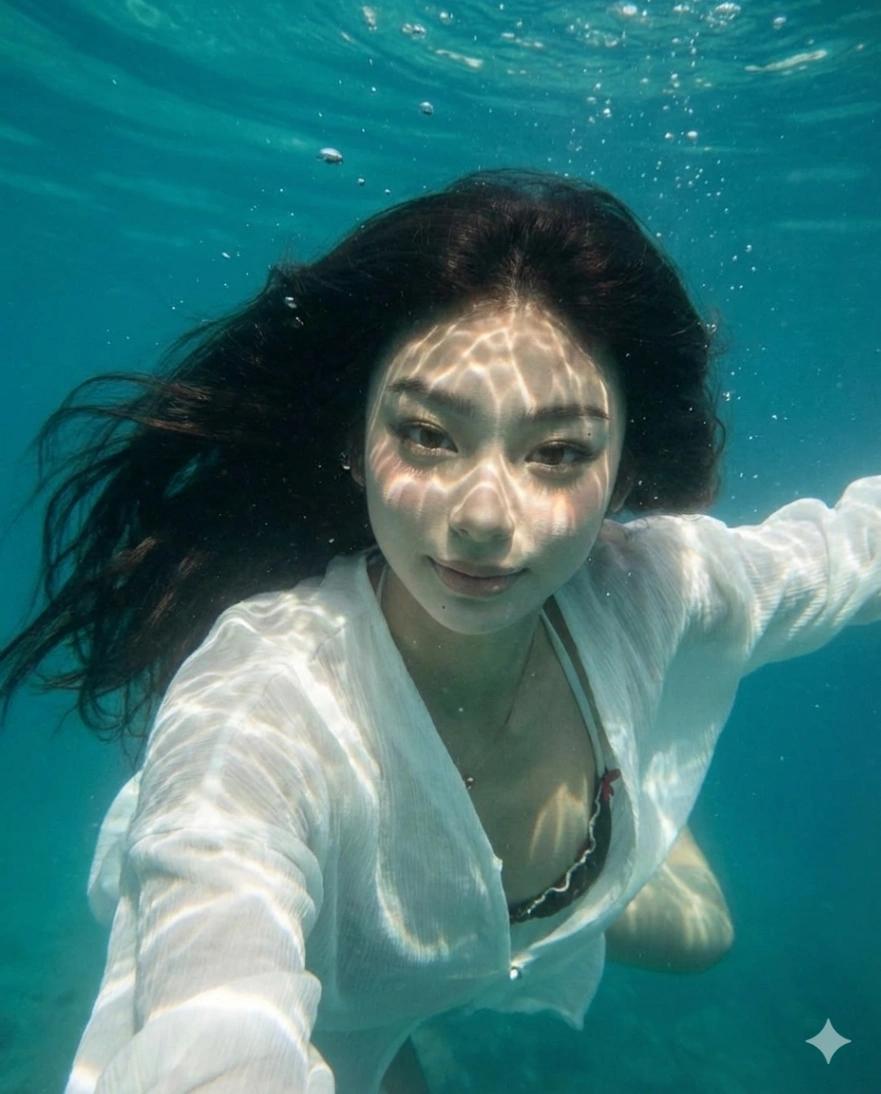
Underwater Portrait Effect
Image
GeminiPrompt Type: Image generation prompt
Click to try on Gemini
1
Number of original images required
11
Total number of views
Transform the uploaded photo to appear as if the subject is submerged underwater, photographed from below the surface.
Underwater visual treatment:
– Apply a natural underwater color shift — cyan-blue-green tint that deepens toward the edges of the frame
– Light source should come from above (the water surface), creating dappled caustic light patterns across the subject's face and body
– Rippling, shifting light caustics should be visible on the skin — bright, irregular wavy light patterns characteristic of pool or ocean surface refraction
– Subtle light rays streaming downward through the water from above
Subject treatment:
– Hair should appear floating and weightless, spreading outward and upward as if suspended in water
– Clothing and fabric should billow and float gently
– Skin should have a luminous, slightly blue-tinted glow with warm undertones preserved
– Small air bubbles scattered around the subject — varying sizes, some catching light
– Expression and pose preserved from original photo
Water environment:
– Gradient from lighter blue-green near the top (surface) to deeper blue-teal at the bottom
– Visible particulate matter floating in the water — tiny bright specs catching the light
– Soft volumetric light shafts from above
– Gentle overall softening as if photographed through water
Hard rules:
– Preserve the subject's face, features, and expression exactly
– Do NOT change the outfit (only add floating/billowing effect)
– Do NOT change the aspect ratio
– Apply underwater color, caustic lighting, floating hair, and bubble effects only
Output should look like an editorial underwater photograph — ethereal, dreamlike, and cinematic.