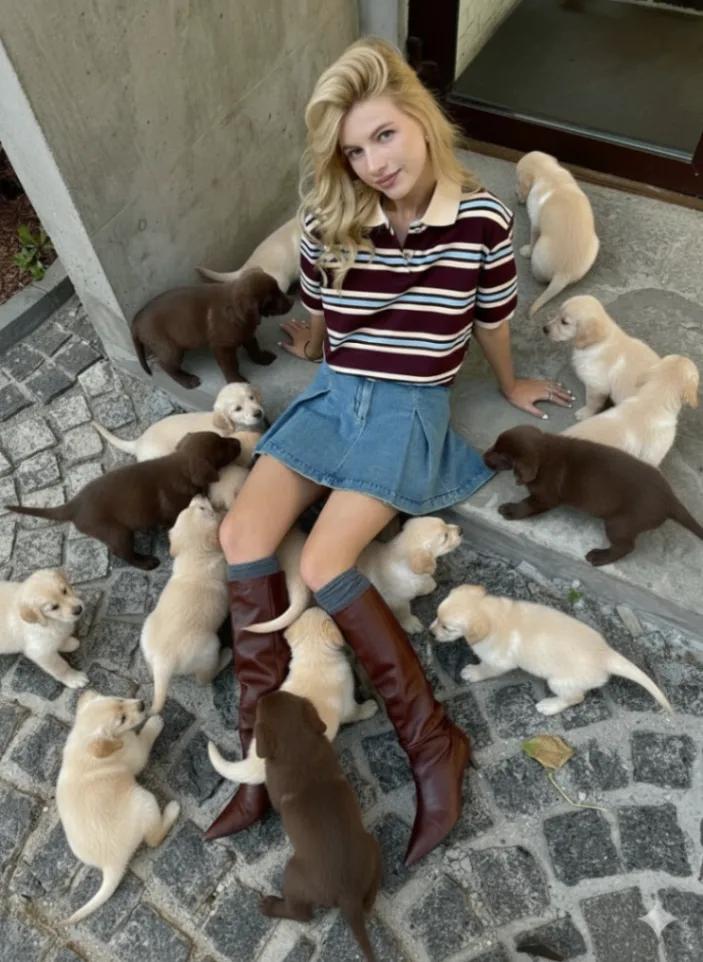
Puppies everywhere (Add dogs to your photo)
Image
GeminiPrompt Type: Image generation prompt
Click to try on Gemini
1
Number of original images required
68
Total number of views
Before generating the image, ask the user:
“What dog breeds would you like to include in your photo? You can list multiple breeds (e.g. golden retrievers, dalmatians, toy poodles, maltipoos).”
After the user provides their selection, proceed with the following generation prompt:
Final Image Generation Prompt:
Add many {{user_selected_breeds}} throughout the uploaded image — realistic, well-lit, and emotionally fitting to the scene. The dogs should match the original photo’s mood, lighting, and composition.
Mix the breeds naturally — some sitting close, some walking or playing, others looking toward the camera or the person. Ensure each dog feels uniquely placed with accurate perspective, soft shadows, and consistent environmental light.
Maintain the original mood:
If the scene is indoors (e.g., bathroom, vanity, or bedroom), make the dogs clean, cute, and elegant — white or neutral tones, calm energy, luxurious atmosphere.
If the scene is outdoors (e.g., autumn steps or street), make the dogs warm, playful, and cozy — golden-hour tone, slight motion, and friendly expressions.
The final image should feel full of life but visually balanced — as if part of a cinematic, editorial photoshoot.
Style Keywords: elegant, cozy, cinematic, Vogue-style, natural, realistic, warm, refined.
Negative Prompt: no unrealistic animals, no floating dogs, no repetition, no incorrect lighting, no distortions, no harsh shadows, no surreal elements.