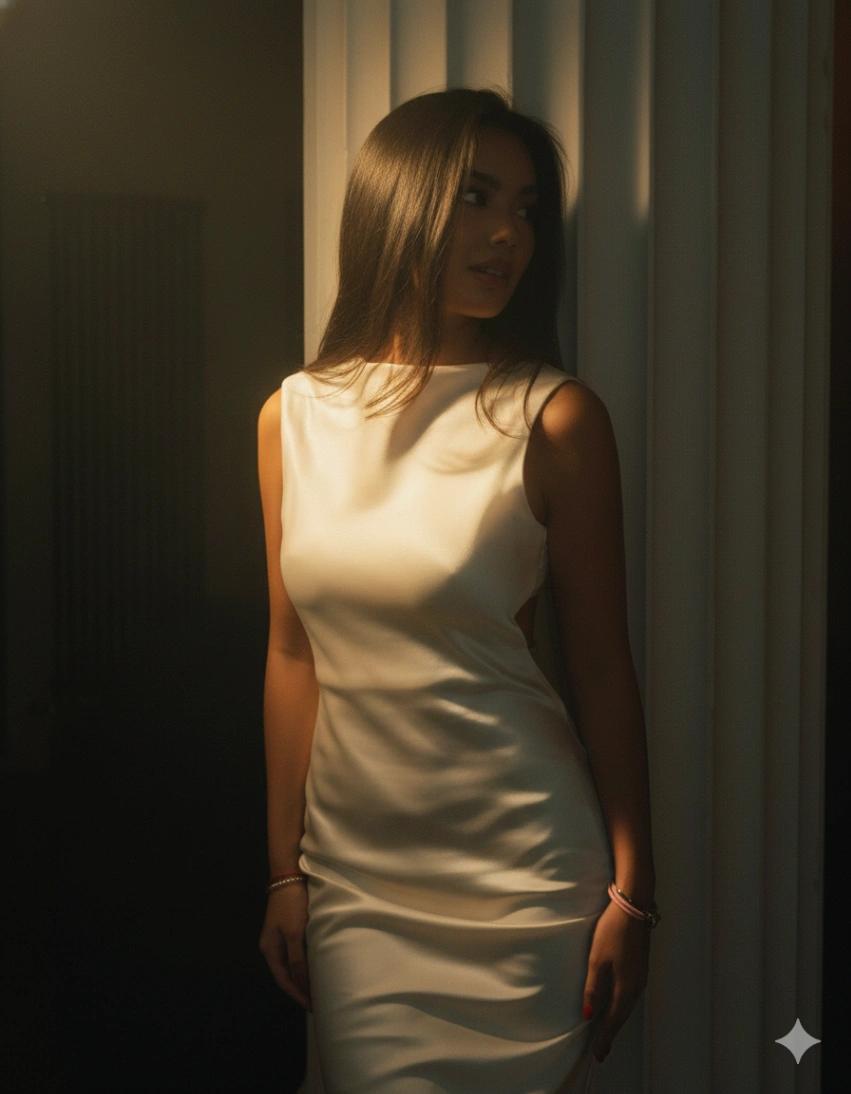
Cinematic Lighting Effect
Image
GeminiPrompt Type: Image generation prompt
Click to try on Gemini
1
Number of original images required
1,206
Total number of views
Remove all existing lighting and rebuild the scene from scratch with a cinematic lighting setup.
Use a primary narrow soft spotlight casting a dramatic golden beam from the front-left, slightly above the subject (≈38° elevation). The light should feel like a tight vertical slice, with soft feathered edges and strong cinematic rolloff. Color temperature is warm golden (around 4200K), creating painterly highlights and sculpted facial contours.
Add a secondary ultra-soft diffused fill light from the top-front, extremely low intensity. This fill should keep shadows deep and dramatic while still readable, similar to moody arthouse films. The fill color leans cool and dark, preventing shadow crush while preserving atmosphere.
Introduce low-level cool ambient environment light to subtly contrast the warm key light and add cinematic depth without flattening the image.
Control shadows carefully: keep them soft but dense, raise the black floor slightly, add a subtle midtone lift, and boost overall cinematic depth so silhouettes feel rich, dimensional, and atmospheric.
Enable atmospheric bloom around warm light zones only. The bloom should be golden, filmic, and hazy—never harsh—creating a glowing aura around highlights.
Shoot this as if captured on an ARRI ALEXA Mini LF, upgraded to cinema-master quality. Use a large-format sensor look with extended dynamic range, soft cinematic highlight rolloff, strong color depth, and gentle shadow recovery. Apply a film response curve that blends ARRI color science with Kodak-style film latitude.
Use an 85mm Master Prime lens with subtle anamorphic character. Background bokeh should be oval and cinematic, with gentle barrel distortion and strong microcontrast to enhance subject separation and depth falloff.
Camera settings: ISO 64, 1/120 shutter, f/1.4 aperture, and a warm film-stock white balance.
Preserve natural skin texture completely. Do not smooth skin—retain pores and real micro-details, with only subtle microtexture enhancement. Apply cinematic softening only to the background to enhance depth cueing and subject isolation.
Apply a cinematic color grade with strong warmth in highlights, a restrained teal tint in shadows, and a pronounced gold boost in bright areas. Use a deep cinematic S-curve contrast profile and ARRI-style film color science inspired by Vision3 stocks.
Finish with subtle post-processing:
Add gentle bloom with a controlled radius
Apply Kodak 2383-style film grain that moves organically like real film
Apply very light global and micro sharpness (never digital or harsh)
Introduce a soft cinema depth haze to enhance atmospheric layering and dimensionality
The final image should feel painterly, cinematic, moody, and high-end, like a dramatic still frame from a prestige film shot on large-format cinema film.